
Share what your company needs. Keep the rest private.
Every person has their own contacts. Some they share with the company, and the rest stay private. When someone leaves, the shared contacts stay with the company and the private ones go with them.
When someone leaves
Shared contacts stay. Private contacts go with them.
Maya has her own contacts. Three she shared with Northwind, so the whole team can find them. Three she kept private, so only she can see them. Flip the switch to see her leave: the shared contacts stay in the directory, marked as added by a former member, and the private ones go with her. Northwind never saw them.

Shared with NorthwindStays in the Northwind directory
 Ashley BrooksKestrel ComponentsSharedStays
 Tyler NguyenBayline FreightSharedStays
 Sarah KimCopperleaf StudioSharedStays
The whole team can find these.Marked as added by a former member.
Private to MayaGoes with Maya
 Daniel OkaforCopperleaf StudioPrivateGoes with Maya
 Ryan CooperTidewater DesignPrivateGoes with Maya
 Dana WhitfieldFormer colleaguePrivateGoes with Maya
Only Maya can see these.Northwind never saw them, and still doesn't.
Yours and your company's
Yours stays yours. The company's stays with the company.
Your contacts
Everyone you have met, in a list only you can see. It goes with you from job to job.
- Never visible to your company
- Up to 1,000 contacts, free
- Export your data any time
Your company's directory
The contacts the team relies on. They stay with the company when someone moves on.
- Reviewed by an admin, by default
- Visible to members by role
- Kept when people leave
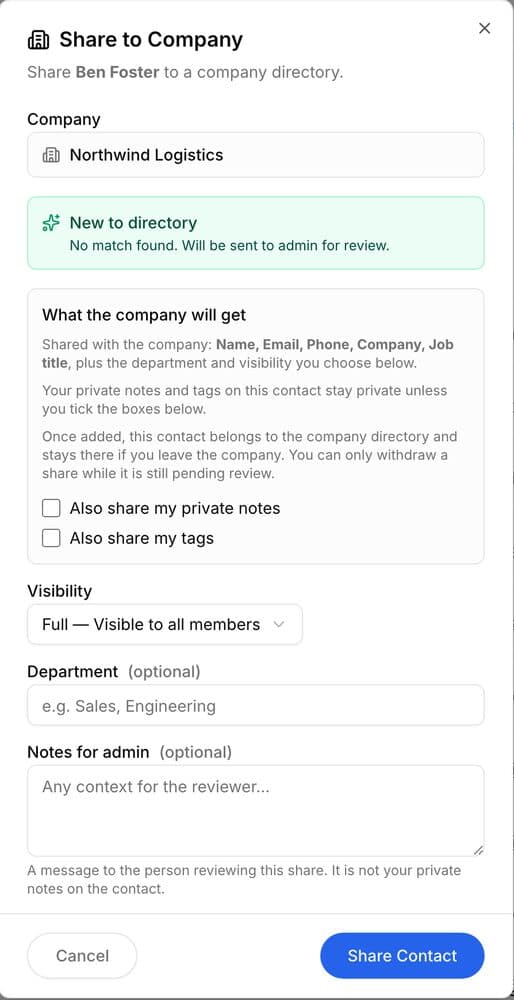
What the company gets
You see exactly what you share.
Sharing a contact shows what goes to the directory: name, email, phone, company and job title. Your private notes and tags stay private unless you check the boxes.
By default, an admin reviews each new contact before the team sees it. You can withdraw a share while it's still waiting.
Questions
What happens to contacts when someone leaves?
The contacts they shared stay in the company directory, marked as added by a former member. Their private contacts go with them.
Can my company see my private contacts?
No. Private contacts are visible only to you. Your company sees a contact only after you share it.
What does my company get when I share a contact?
Name, email, phone, company and job title. Your private notes and tags stay private unless you choose to include them.
Who approves shared contacts?
By default, an admin reviews each shared contact before the team sees it. You can withdraw a share while it is waiting.
Keep what your company builds.
Free for personal use. Companies start free.
